

TL;DR
Effective internal linking is a cornerstone of modern SEO. It involves strategically connecting pages on your website using crawlable links with descriptive anchor text. A well-executed strategy boosts your search rankings by helping search engines discover and understand your content, distributing authority (link equity) to important pages, and establishing your site as a topical authority, which ultimately guides users to valuable information.
The Foundation: Why Internal Linking Is Crucial for SEO
Internal linking is far more than just adding hyperlinks to your content; it's the architectural blueprint for your website. At its core, an internal link connects one page on your domain to another page on the same domain. According to Google's own documentation, these connections are vital signals that help search engines find, index, and understand the relationships between your pages. Without a thoughtful linking structure, even your best content can remain isolated and underperform.
The importance of this practice rests on three primary benefits that directly impact SEO performance. First, internal links improve site crawlability and indexing. Search engine bots discover new content by following links from pages they already know. A logical linking structure acts as a roadmap, guiding crawlers efficiently through your site and ensuring new or updated pages are found and indexed faster. Pages with no internal links pointing to them, known as "orphan pages," are often missed entirely.
Second, internal links are the primary mechanism for distributing authority across your site. Pages that earn backlinks from external websites accumulate authority, often referred to as PageRank or "link equity." By linking from these high-authority pages to other relevant pages on your site, you pass some of that strength along. As explained by experts at Semrush, this process can elevate the visibility of newer or less-authoritative content, giving your entire site a lift in search results.
Finally, a deliberate internal linking strategy helps establish topical authority. When you create a network of interconnected pages around a specific subject—linking them together in a logical way—you signal to search engines that you have comprehensive expertise in that area. This is the foundation of the topic cluster model, which strengthens your site's relevance for core keywords and improves the user journey by guiding visitors to related, valuable content.

Core Best Practices: How to Craft the Perfect Internal Link
Creating an effective internal link involves more than just highlighting text and adding a URL. The mechanics of the link—from its crawlability to its anchor text—determine its value for both users and search engines. The fundamental rule is to ensure your links are crawlable, meaning they are standard <a> HTML elements with an href attribute that Google can easily parse.
The most critical element of a powerful internal link is its anchor text. This is the visible, clickable text that provides context about the destination page. Vague phrases like "click here" or "read more" offer zero SEO value and create a poor user experience. Instead, your anchor text should be descriptive and relevant to the page you're linking to. As a best practice, you should vary your anchor text to maintain a natural link profile. Experts at Traffic Think Tank recommend mixing different types, including exact-match keywords, partial-match phrases, and related terms.
To illustrate the difference, consider the following examples:
| Bad Anchor Text (Vague & Unhelpful) | Good Anchor Text (Descriptive & Relevant) |
|---|---|
| Click here | our complete guide to SEO audits |
| Read more | learn about different link building strategies |
| this article | troubleshoot common 404 errors |
| Website | explore our content marketing services |
To put this into practice, follow these simple steps every time you add an internal link:
- Identify Relevant Opportunities: As you write, think about other content on your site that provides deeper context or answers a related question for the reader.
- Choose Descriptive Anchor Text: Select a phrase or keyword within your sentence that accurately describes the page you are linking to. Aim for a natural fit within the content.
- Link to Deep Pages: Don't just link to your homepage or contact page. Prioritize linking to specific, relevant blog posts, product pages, or guides that add value to the current topic.
- Ensure Context: The words surrounding your link matter. The sentence or paragraph should support the link and make it clear to the user why clicking it would be beneficial.
Advanced Strategy: Building Powerful Content Hubs
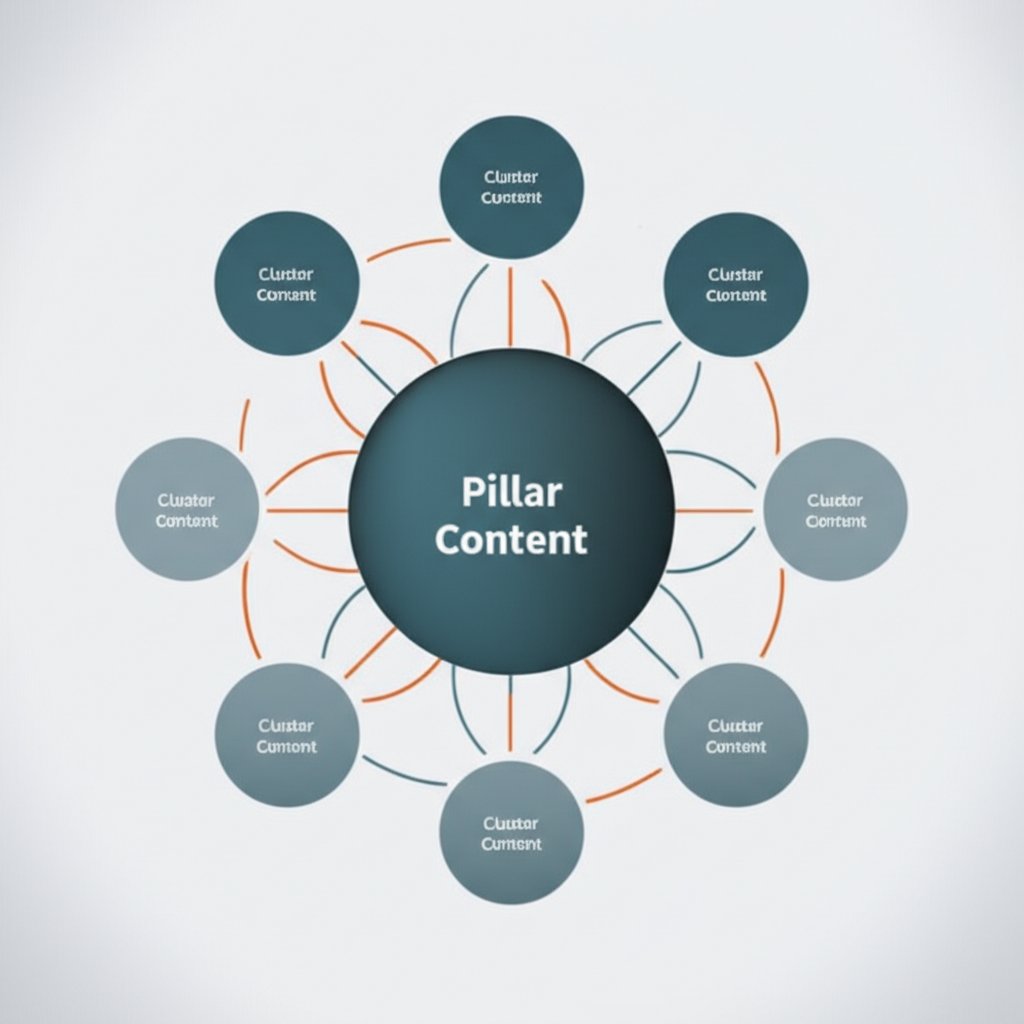
To elevate your internal linking from a page-level tactic to a site-wide strategy, you must embrace the concept of content hubs, also known as topic clusters. This advanced model involves organizing your content architecture to build undeniable topical authority. A content hub consists of a central "pillar page" covering a broad topic comprehensively, which then links out to multiple "cluster pages," each detailing a specific subtopic in greater depth. In return, every cluster page links back to the central pillar.
This structure creates a powerful, self-reinforcing network. As detailed in guides from Siteimprove, this model signals to search engines that you are an authority on the pillar topic. The dense interlinking ensures that link equity flows efficiently between the pillar and its clusters, boosting the ranking potential of all pages involved. For users, this creates a seamless experience, allowing them to easily navigate from a general overview to specific areas of interest.
For example, a content hub on "Digital Marketing" might look like this:
- Pillar Page: A comprehensive guide titled "The Foundations of Digital Marketing."
- Cluster Pages:
- A detailed article on "Keyword Research for SEO."
- A step-by-step tutorial on "Creating a Social Media Calendar."
- A guide to "Measuring ROI in PPC Campaigns."
- An analysis of "Effective Email Marketing Strategies."
Executing a content hub strategy requires significant content creation. Each cluster page needs to be a thorough, high-quality article. For marketing teams looking to scale this process, AI-powered tools can be invaluable. Marketers and creators can revolutionize their workflow with platforms like BlogSpark, an AI blog post generator that helps transform ideas into engaging, SEO-optimized articles. Using such tools for initial drafts can free up your team to focus on strategic planning and adding unique insights, making the creation of comprehensive topic clusters more manageable.
Audit and Optimize: Maintaining a Healthy Link Structure
An internal linking strategy is not a "set it and forget it" task. Over time, as you add, remove, and update content, your site's link structure can degrade. Broken links, redirects, and orphaned pages can accumulate, harming both user experience and SEO. Performing a regular internal link audit is essential for maintaining a healthy, efficient site architecture and ensuring your efforts continue to deliver results.
An audit involves systematically identifying and fixing common issues that weaken your linking structure. Key problems to look for include:
- Broken Internal Links: These links point to pages that no longer exist (a 404 error), creating a dead end for users and wasting link equity.
- Orphan Pages: These are pages with no incoming internal links, making them nearly impossible for search engines and users to discover.
- Deep Pages: Important content should be accessible within three clicks from the homepage. Pages that are buried too deep in your site structure may be seen as less important by crawlers.
- Internal Redirects: Links should point directly to the final URL. Linking to a page that then redirects to another wastes crawl budget and slightly slows down page load time.
- Keyword Cannibalization: This occurs when multiple pages target the same keyword, confusing search engines. You can use internal links to signal which page is the most important or authoritative one.
To stay on top of these issues, implement a routine maintenance process. Tools like the one offered by Search Engine Land's parent company, Semrush, or Screaming Frog can crawl your site and generate reports that flag these specific problems. Use the following checklist as a starting point for a monthly review:
Monthly Internal Linking Audit Checklist:
- Run a full site crawl to identify 404 errors and fix broken internal links.
- Check the crawl report for orphaned pages and add relevant links to them from other pages.
- Review page crawl depth and find ways to link more directly to important pages that are more than three clicks from the homepage.
- Filter for redirect chains or loops and update the source links to point to the final destination URL.
- Analyze anchor text distribution to ensure you're using a diverse and descriptive set of terms.
Frequently Asked Questions About Internal Linking
1. How many internal links should be on a page?
There is no magic number for how many internal links a page should have. The best practice is to link where it is natural and helpful for the user. Focus on quality and relevance over quantity. If a page has hundreds of links, it can dilute the value of each one and overwhelm the user. A good rule of thumb is to add links only when they genuinely add value to the reader's experience.
2. Should internal links open in a new tab?
Generally, internal links should open in the same browser tab. This creates a seamless navigational flow and keeps the user moving through your site as intended. Opening internal links in a new tab can disrupt the user journey and lead to a cluttered browser with too many open tabs. Reserve the "open in new tab" functionality primarily for external links, so users can explore an outside resource without losing their place on your site.
3. What is the difference between internal and external links?
Internal links connect pages within the same website domain, helping with site navigation, structure, and distributing authority. External links (or outbound links) point from your website to a page on a different domain. External links are used to cite sources, provide additional resources, and can help build trust with your audience by referencing other authoritative sites.


